Can I install an AGP 3.0 video card in an AGP 2.0 slot on my motherboard?
I just bought a new video card from eBay (ATI Radeon 9250, AGP 3.0, 8x speed, with 128 MB of DDR). Then after I already paid for it, I found out that there are three different kinds of AGP! This video card is for AGP 3.0, whereas the AGP slot on my motherboard is AGP 2.0, so now I’m not sure whether this video card is compatible with my motherboard.
Here’s a summary of the three different kinds of AGP:
AGP 1.0
Speed: 1x or 2x
Voltage: 3.3 volts
AGP 2.0
Speed: 4x
Voltage: 1.5 volts
AGP 3.0
Speed: 8x
Voltage 0.8 volts
I’m not worried about the difference in speed because I know that AGP 2.0 only supports a maximum speed of 4x, so even if the card does work, then I’m sure that the speed will be only 4x.
But what I’m worried about is the difference in voltage. Since AGP 3.0 needs only 0.8 volts, then would the 1.5 volts coming out of my AGP 2.0 slot burn up the card?
Wow. You learn something new every day. I had no idea either. I, like you, would’ve imagined you could use it, but it would just be limited to 4x speed. It would be poor behaviour on the part of Radeon to make a card that fits in a slot, but which might explode cos the voltage is different. I’m sure these things should be backwards compatible.
Anyway, I don’t know what I’m talking about. Wait for more replies.
EDIT: OK, well I found this page, which seems to be EXACTLY the info you need. Unfortunately it’s not really definitive. Looks like you can safely test your card at least, though it may not operate properly…
neoseeker.com/Hardware/faqs/kb/10,63.html
Good Q…I am thinking of getting a new vid card.
I replaced my graphics card a while ago and was wondering about this, too. Simple answer: just have a look at the technical data of the graphics card you want to buy  . If it says something like “supported AGP standards: 4x 8x” then there should be no problems. Alternatively, have a look at ATI certified graphics cards here.
How do you find AGP cards anyway ? You pick up a price list from Nova to study (the extremely limited selection in Taiwan), see a fairly good chipset at an OK price, look up the exact specs on the net, and it’s PCI-Express only. WFT ? :loco: Wouldn’t this be a useful thing to put on the pricelist ?
Here’s the eBay webpage that has the technical data about the video card that I just bought:
cgi.ebay.com/ws/eBayISAPI.dll?Vi … 8730140789
You will see that it says “Minimum System Requirement: One available AGP 3.0 compliant slot”. But unfortunately, I didn’t realize this until after I had already paid for it!
“Backwards compatible” is actually the opposite of what I need! For example, “backwards compatible” means that a motherboard with an AGP 3.0 slot can accept video cards that are AGP 3.0, AGP 2.0, and AGP 1.0. And motherboards with an AGP 2.0 slot can accept video cards that are AGP 2.0 and AGP 1.0. This is true. But is AGP also “forwards compatible”? In other words, can I stick an AGP 3.0 video card into an AGP 2.0 slot?
Actually, it seems my previous answer was too simple  : if I understood Intel’s AGP 3.0 specifications (see pages 39, 40, 73) correctly, an 8x or 4x AGP 3.0 card can have one of the following connector types:
* AGP3.0 (won’t work with AGP 2.0 1.5V motherboard)
* Universal 1.5V AGP3.0 (will work)
* Universal AGP3.0 (will work).
So, unlike I wrote before, an AGP card that supports 8x and 4x speeds does not necessarily work on an older AGP 2.0 motherboard. What determines if the card works or not is the card’s (and the motherboard’s) connector type!
However, while probably technically correct, this answer is pretty useless because almost no retailer or even graphics card manufacturer publishes the necessary piece of information. :s
The only good news is that no damage can be done if you try running an AGP 3.0 0.8V card on an AGP 1.5V motherboard (pg. 73).
For those thinking about upgrading, it might be a good idea to look for customers’ reviews of the graphics card you want to buy. If there are many reviews from people saying they upgraded their older system with this graphics card, this indicates the card is likely to work with a AGP 2.0 1,5V motherboard.
[quote=“Mark Nagel”]
“Backwards compatible” is actually the opposite of what I need! For example, “backwards compatible” means that a motherboard with an AGP 3.0 slot can accept video cards that are AGP 3.0, AGP 2.0, and AGP 1.0. And motherboards with an AGP 2.0 slot can accept video cards that are AGP 2.0 and AGP 1.0. This is true. But is AGP also “forwards compatible”? In other words, can I stick an AGP 3.0 video card into an AGP 2.0 slot?[/quote]
What I meant was that the card should (in an ideal world of course) be backwards compatible, not the motherboard, since in this case the card is newer than the motherboard.
The AGP 3.0 video card arrived in the mail today, so I installed it in my computer. Result: It works!
Well, I doubt that my AGP speed is now 8x because the AGP slot on my motherboard is 2.0, which only supports a maximum speed of 4x. So I assume that my speed is still 4x. But anyway, I now have a video card with 128 MB of RAM. (My old video card only had 32 MB of RAM).
Hypermegaglobal, you said that it depends on the type of connector. I looked closely at the connector of the new video card before I installed it, and it’s exactly the same as the connector on the AGP 2.0 video card that used to be in my motherboard (58 pins on each side of the card, 3 slots).
I just ran a program which tells me how much RAM is on my video card (a freeware program called “Astra32”, which I found at http://www.download.com). I was shocked at the result: only 16 MB of RAM on my new video card (ATI Radeon 9250), which is supposed to have 128 MB of RAM!
So I was wrong in my post above when I said that this AGP 3.0 video card works fine in the AGP 2.0 slot on my motherboard. Well, it does “work”, but I only get 16 MB of RAM, whereas with my original video card, I had 32 MB of RAM!
So I guess the card is really composed of two separate circuits: One circuit is for AGP 3.0, which has 128 MB of RAM and runs on 0.8 volts, and the other circuit is for AGP 2.0, which has only 16 MB of RAM and runs on 1.5 volts.
So this new video card is useless to me because it’s even less RAM than I already had on my old video card! If anyone wants this AGP 3.0 video card, I’m going to sell it at the “Buy and Sell” forum.
[quote=“Mark Nagel”]I just ran a program which tells me how much RAM is on my video card (a freeware program called “Astra32”, which I found at http://www.download.com). I was shocked at the result: only 16 MB of RAM on my new video card (ATI Radeon 9250), which is supposed to have 128 MB of RAM!
So I was wrong in my post above when I said that this AGP 3.0 video card works fine in the AGP 2.0 slot on my motherboard. Well, it does “work”, but I only get 16 MB of RAM, whereas with my original video card, I had 32 MB of RAM!
So I guess the card is really composed of two separate circuits: One circuit is for AGP 3.0, which has 128 MB of RAM and runs on 0.8 volts, and the other circuit is for AGP 2.0, which has only 16 MB of RAM and runs on 1.5 volts.
So this new video card is useless to me because it’s even less RAM than I already had on my old video card! If anyone wants this AGP 3.0 video card, I’m going to sell it at the “Buy and Sell” forum.[/quote]
Uhm, wait a second before you throw it away and try the following (instructions for Windows XP):
Right-click anywhere on the desktop and select Properties. Click the Settings tab and then press the Advanced button. Check under the Adapter tab to see how much memory the video card really has. Also check if it says “ATI Radeon 9250” and if the driver has been installed correctly.
I tried that, but it doesn’t tell me how much memory the video card has. Here’s what it says:
RADEON 9200 SERIES
Manufacturer: ATI Tech. - Enhanced
Chip Type: Radeon 9200 Pro (5960) Rev 1
DAC Type: Internal
Features: DirectDraw 1.0
Software Version: 4.0
(By the way, I’m running Windows ME, but I think this control panel is probably the same no matter which version of Windows I’m running.)
As for the driver files: I’m sure that all of the driver files have been installed correctly because otherwise it wouldn’t say “RADEON 9200 SERIES” at the top of this dialog box. (My old card was an NVidia RIVA TNT2.) And when I first installed the card, I put the CD in my drive and I had to click through several dialog boxes while it installed all of the drivers.
I also tried putting my old video card back in my computer and then running Astra32 again to make sure Astra32 is working properly. The result: Astra32 said that it had 32 MB of RAM, which is correct. (Luckily, I didn’t have to re-install the drivers for my old video card because they were still on my hard drive.)
Then I put my new video card in again and ran Astra32 again. The result: Astra32 said that it had only 16 MB of RAM.
You can try Astra32 yourself (it’s freeware) to see if what it says is correct. I would be delighted if Astra32 is wrong, but I doubt it.
Here’s my “Video Info” screen shot, looks correct to me. What does yours say under “AGP Version”, “AGP Speed” and “Driver Version/Date”?
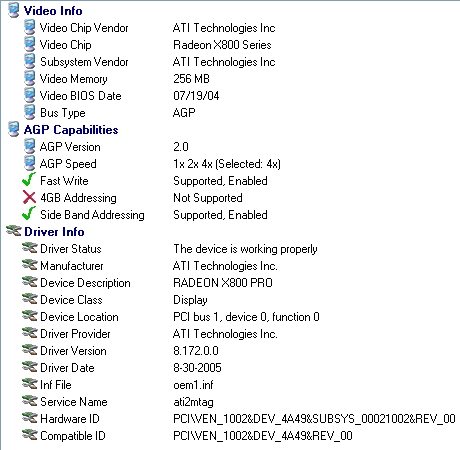
If you installed the ATI Catalyst Control Center, it should also be able to show the video memory.
BTW, thanks for mentioning the Astra32 utility, my primary hard disc is being shown as having a “poor” health status.  I’m offline to run some diagnostics now.
Here’s what Astra32 says for “Video Info” with my new video card installed:

As you can see, it says “Video Memory: 16 MB”
Looks like your card is running in a VESA compatible mode, which is not what you want. Try the following (if you haven’t already done this):
-
See if BIOS has an option called “Enable AGP” or something like this. It has to be enabled.
-
Download and install the ATI Catalyst Driver for Windows ME. Should be this one.
Hope this helps.