Good description. 
1 Like
Just to add a data point, I had registered for the National Library Card this year and in the application form you submit online you can enter your ARC number.
Though I only discovered when I went to login to reserve a media room by entering my ID + DOB as instructed didn’t work (fyi you need 2 people to reserve the room and while my Taiwanese friends worked, mine didn’t).
When I enquired at the desk the next day about it saying I was unable to do any reservation online they said, only Taiwanese can use their ID (that’s on the NHI, Driving License, etc), foreigners ID format isn’t supported and your ID is actually NCL********.
When you register it asks for your ID number and DOB which works fine, though it doesn’t end up as your actual ID later in the system.
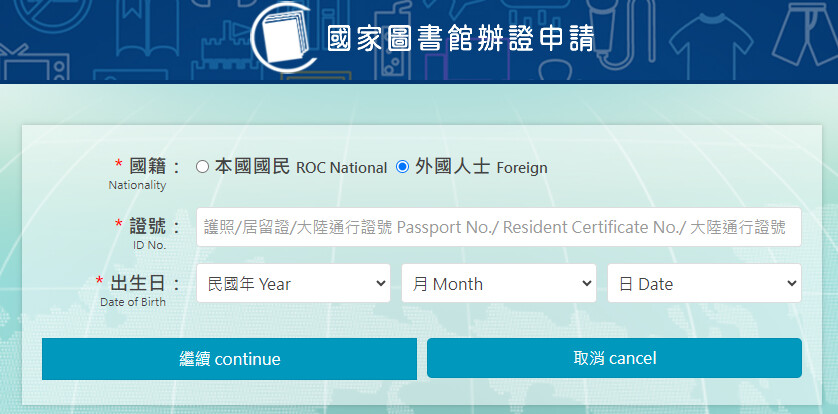
I would have expected the National Library system to support the foreigner ID format as being the actual Library Card ID like it does for the Taiwanese ID being under the government and all but anyway, just another negative non-inclusive ID number experience as by the time this got sorted the room was already taken.
11 Likes
Link?
2 Likes
Just encountered a problem while attempting to register with the JKOPay app.
I involuntarily got the new ARC number back in February-ish when I renewed my gold card, but the JKOPay identity verification system, which is based on binding a local bank account, appears to be incorrectly pulling my old ARC number from… somewhere, rather than my new number.
I’ve tried this with three banks account now (Mega, Richart, and CTBC), all of which are registered to my new ARC number, and the result is the same. The identity verification then fails, presumably because of the number mismatch. I can’t add credit cards either, I guess for the same reason.
I’m not really sure where JKOPay is getting my old number from, given that I’ve never used the app before and only installed it a couple of days ago. All I can think is that I might have been automatically registered in their database when I’ve ordered stuff from overseas on Shopee before (if I remember correctly, JKO provides some KYC services to Shopee and/or EZ Way for this). I’ve already updated Shopee with my new ARC details but apparently that info doesn’t get passed on.
Probably kind of a niche problem, but thought I’d make a record of it for posterity. Any ideas? I’ve sent an e-mail to the JKOPay customer service, will see if they bother answering.
2 Likes
Richart bank account (for alien residents) only works with Google Pay so far. So it will not work either way.
I successfully linked Land Bank, Mega Bank, Cathay United, Chang Hwa Bank, Post Bank with JKO Pay (and Easy Wallet). But I also did not use JKO prior to my new ID number.
If you have updated your ID number with the banks, then contact JKO. I had a similar problem with Easy Wallet and one bank. I updated my ID with both which broke the link from working, but relinking would not work until Easy Wallet manually fixed something.
1 Like
To clarify, this isn’t really about using my Richart card as a payment method - it’s the identity verification step using the bank account number (not the debit/credit card number). You probably had to do a similar thing using another Taiwanese bank account when you first opened your Richart account.
I’m not sure if that’s something also not supported by Richart for foreigners, but it is an independent thing primarily caused by the ID number change and the resulting discrepancy (as with the two other banks I tried).
Yes, this has been an issue for some alien residents. There are many systems interacting and somewhere one step was forgotten by the bank staff while updating the ID number and it errors out now.
I doubt it’s the banks (plural) in this case - it’s almost certainly something on JKO’s end. Whatever CTBC and Mega Bank might have forgotten to do, my old ARC number appeared in JKOPay for all three banks so it’s unlikely they both forgot, and Richart/Taishin has never had my old ARC number.
Probably similar issue I had with Easy Wallet I described.
And this problem occurs only if you somehow used JKO Pay with your old ID prior (I don’t use Shopee). I and several other foreign residents signed up with new ID for the first time on JKO Pay lately and had no issues. Raise a support ticket with JKO Pay, I think they can fix it quickly.
1 Like
Contact jkou’s support, it seems their problem from what u wrote
Yeah, I sent an e-mail last night as I wrote in my original post - just wanted to make a note of it here too.
1 Like
I had the same problem with linepay too and needed to contact support. Fixed in 1 working day.
Also CTBC doesn’t verify foreigners with LinePay due to them using a different ID number…
4 Likes
Looks like Richart and CTBC are a big no-go to be used as verification of alien resident ID numbers through bank account.
2 Likes
btw.
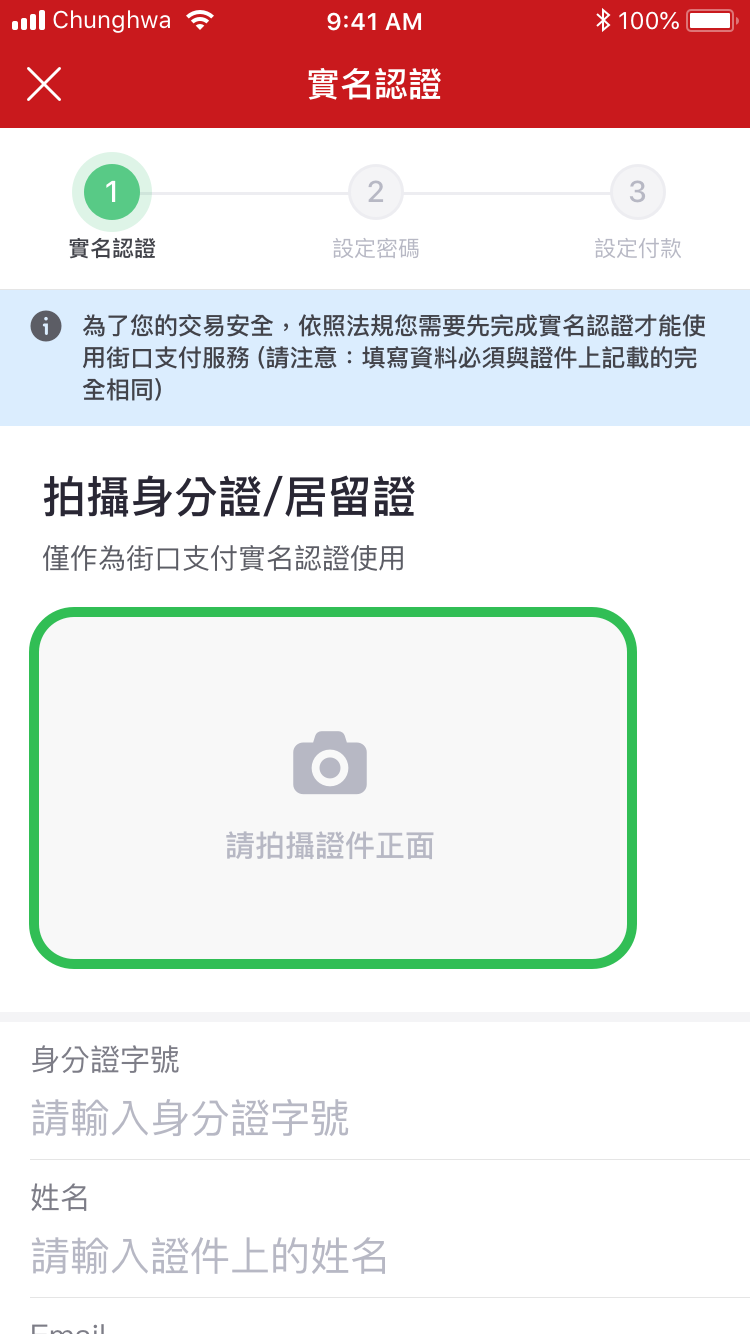
I can’t recall the necessity to verify my ID number when registering for JKO Pay. It worked without linking my bank accounts. They had the pictures of my APRC to verify my ID number.
I later linked my accounts to pull funds from banks of my choosing.
I mean, I’m already signed in, I just can’t really do anything without linking at least one bank account or debit/credit card.
I haven’t uploaded pictures of my ID, nor have I been asked to, and I don’t see any option for it. At what point do you do that?
2 Likes
That’s weird. It definitely didn’t prompt me for that, but I remember it wasn’t possible to take screenshots until after doing the initial registration with the phone number etc. and enabling the screenshot setting, so I was flying blind. I’ve found the option now though!
1 Like
I remember I did this, added the account later on
Okay, so actually my original post was maybe unnecessary. Once I’d uploaded pictures of my ARC and completed the registration, it seems like it updated the old ARC number to the new one in my profile on JKO, because then my new number was showing up when I went to bind my bank account.
Just to check, I tested my accounts with Mega, Richart, and CTBC, and all three correctly showed the new number where they’d been showing the old number before (so this is just prior to the final account binding step). I then did the binding with my CTBC account, which worked without issue.
5 Likes